
dev.to
发布地址: https://dev.to/new
发布时建议:
- 在 dev.to 编辑器顶部的 frontmatter 中填入以下内容
- 封面图建议用项目 logo 或终端截图
Frontmatter (粘贴到编辑器顶部):
---
title: "I Built an Open-Source CLI That Opens RDP Desktops and SSH Terminals in a Browser — No VPN, No Client Apps"
published: true
tags: opensource, go, devops, tutorial
cover_image: https://raw.githubusercontent.com/fengyily/shield-cli/main/docs/logo.svg
---
正文:
Every developer has been there: you need to give someone access to an internal machine — maybe a Windows desktop via RDP, or an SSH terminal — but they don't have the right client installed, and setting up a VPN for a quick session feels like overkill.
I built Shield CLI to solve this. It's an open-source command-line tool (Go, Apache 2.0) that creates encrypted tunnels to your internal services and renders them directly in the browser via HTML5.
What Makes It Different from ngrok / frp?
Tools like ngrok and frp solve network reachability — they forward ports to the internet. But the other person still needs an RDP client, a VNC viewer, or an SSH terminal to connect.
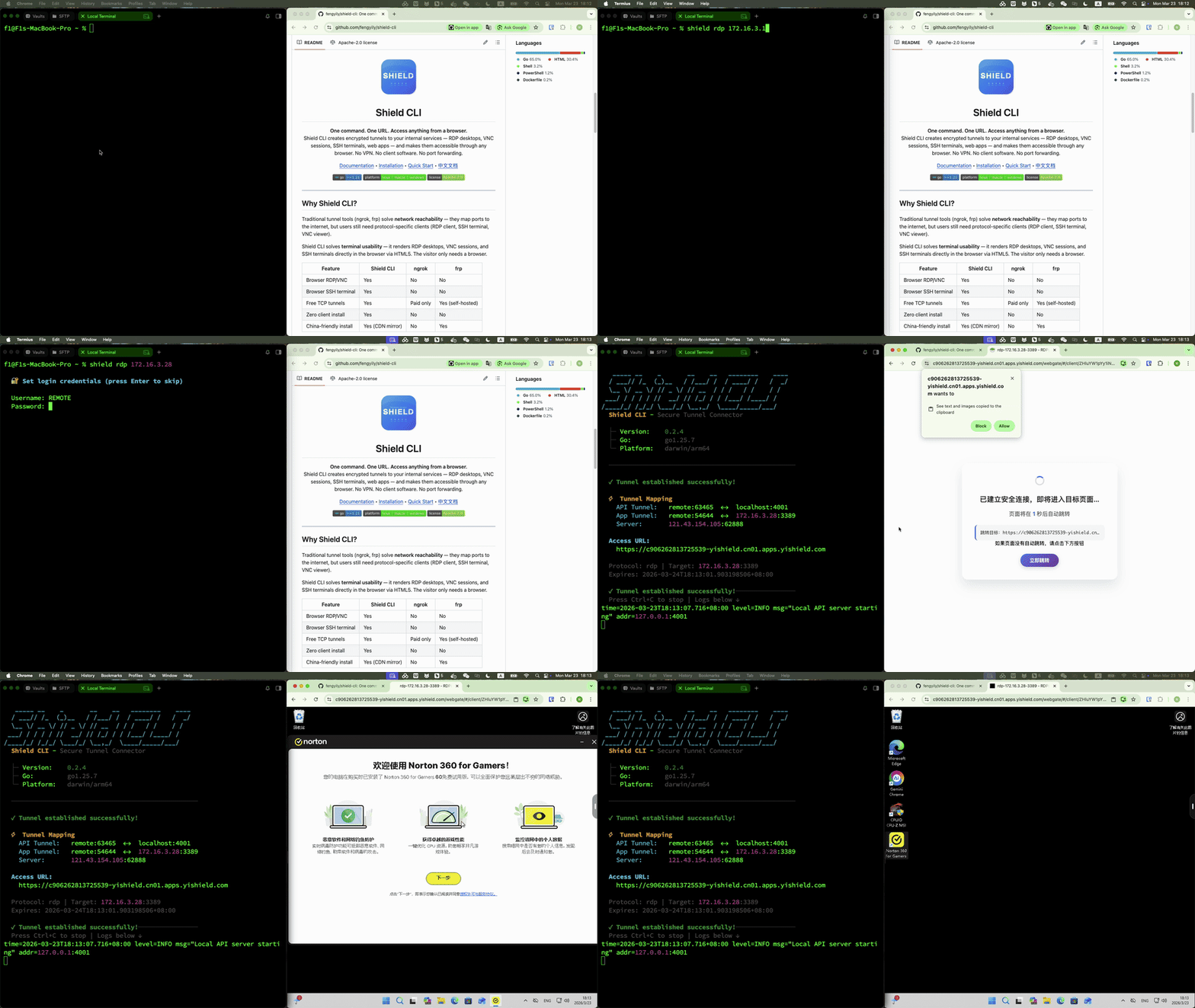
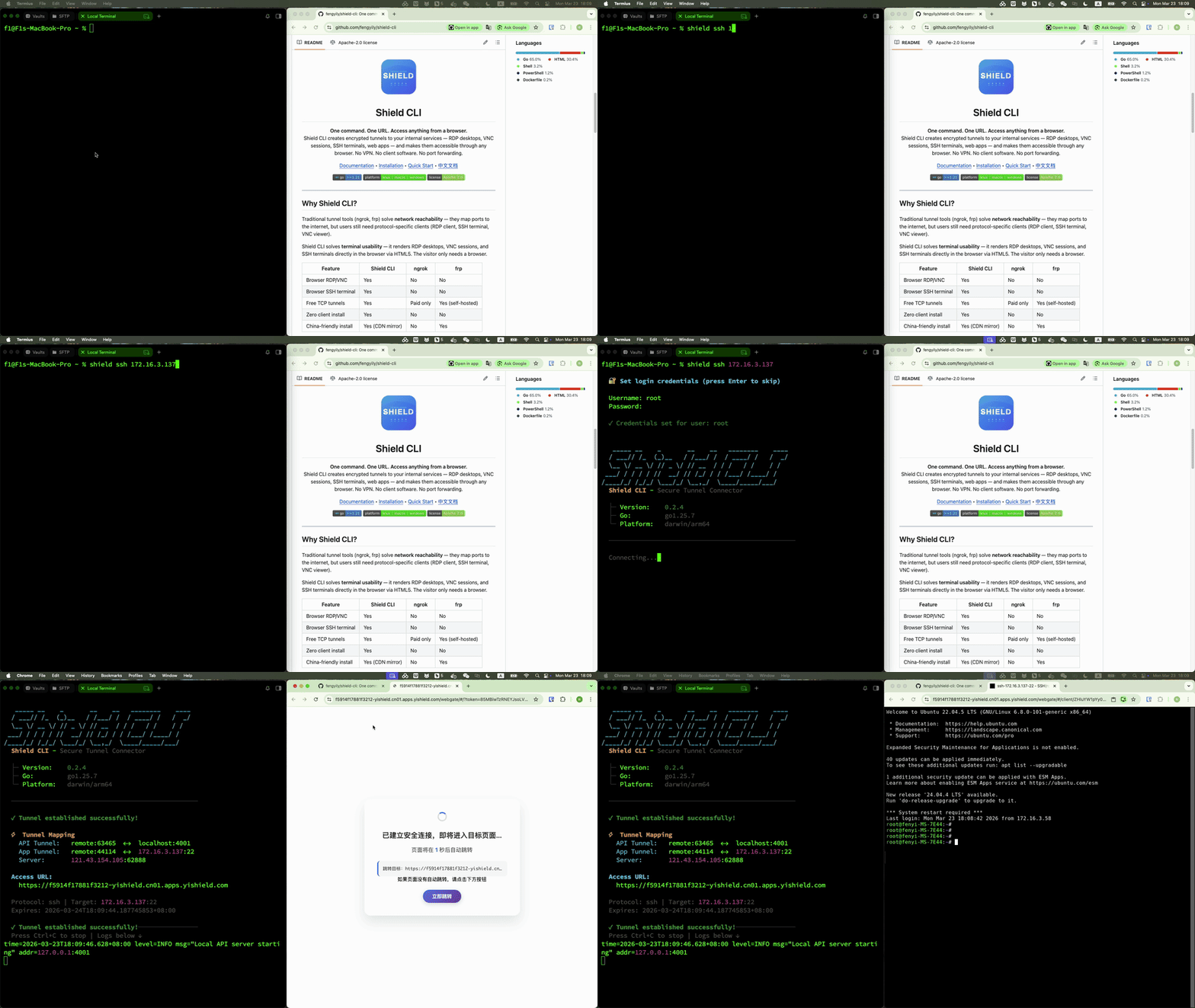
Shield CLI goes one step further: protocol-level HTML5 rendering. The remote desktop or terminal shows up right in the browser tab.
| Feature | Shield CLI | ngrok | frp |
|---|---|---|---|
| Browser RDP/VNC desktop | ✅ | ❌ | ❌ |
| Browser SSH terminal | ✅ | ❌ | ❌ |
| Free TCP tunnels | ✅ | Paid only | ✅ (self-hosted) |
| Zero client install | ✅ | ❌ | ❌ |
Demo
RDP — Full Windows Desktop in a Browser
SSH — Terminal Session in a Browser
Quick Start
Install:
# macOS
brew tap fengyily/tap && brew install shield-cli

# Linux
curl -fsSL https://raw.githubusercontent.com/fengyily/shield-cli/main/install.sh | sh

# Windows
scoop bucket add shield https://github.com/fengyily/scoop-bucket && scoop install shield-cli
Use:
# SSH terminal in browser
shield ssh 10.0.0.5 --username root

# Windows desktop in browser
shield rdp 192.168.1.100 --username admin --auth-pass ******

# Expose a local web app
shield http 3000
One command → one URL → open in any browser. That's it.
How It Works
Internal Service  ←→  Shield CLI  ←→  Public Gateway  ←→  Browser
  (SSH/RDP/VNC)       (Encrypted)     (HTML5 Render)     (Any Device)
Shield CLI uses Chisel (WebSocket-based tunneling) under the hood and establishes two layers:
- API Tunnel — persistent control channel for managing connections
- Resource Tunnel — on-demand data channel per service, mapped to the gateway's HTML5 rendering layer
The gateway translates RDP/VNC/SSH protocols into HTML5 canvas and terminal streams that any modern browser can display.
Web UI
Don't like the command line? Shield CLI also ships with a built-in web dashboard:
shield start
# Opens http://localhost:8181
Add your services, click Connect, and get a browser-accessible link. Supports up to 10 saved configurations with AES-256-GCM encrypted credential storage.
Real-World Use Cases
- Remote support: Send a link to a colleague — they see your Windows desktop in their browser, no software to install
- Dev environment sharing: Expose your local app to a client for a demo, without deploying
- Emergency ops: SSH into a production server from your phone's browser
- Contractor access: Give temporary SSH access without VPN credentials — revoke by closing the tunnel
Honest Limitations
I want to be upfront about where Shield CLI is today:
- Gateway is hosted — traffic goes through Shield's public gateway (self-hosted server is on the roadmap)
- 3 concurrent connections — sufficient for personal use, not enterprise scale yet
- No UDP — WebSocket-based, so UDP protocols aren't supported
- Young project — the community is small compared to ngrok (25k+ stars) or frp (80k+ stars)
Try It Out
# Install and run in under 30 seconds
curl -fsSL https://raw.githubusercontent.com/fengyily/shield-cli/main/install.sh | sh
shield ssh- GitHub: fengyily/shield-cli
- Docs: docs.yishield.com
- License: Apache 2.0
I'd love your feedback — star the repo if it looks useful, or open an issue if something doesn't work. Thanks for reading! 🙏